7 Best AI Receptionists for Small Business in 2026 (Honestly Compared)
Voicemail costs small businesses real jobs, roughly a third of inbound calls go unanswered, and most callers won't leave a message. This guide compares the 7 best AI receptionists of 2026 on the criteria that actually decide the outcome: whether it books like your front desk or just like a calendar, whether pricing survives a busy month, and whether it handles the follow-up work after the call. Full disclosure: we build one of them, so our criteria are public, and our own trade-offs are listed right alongside everyone else's.

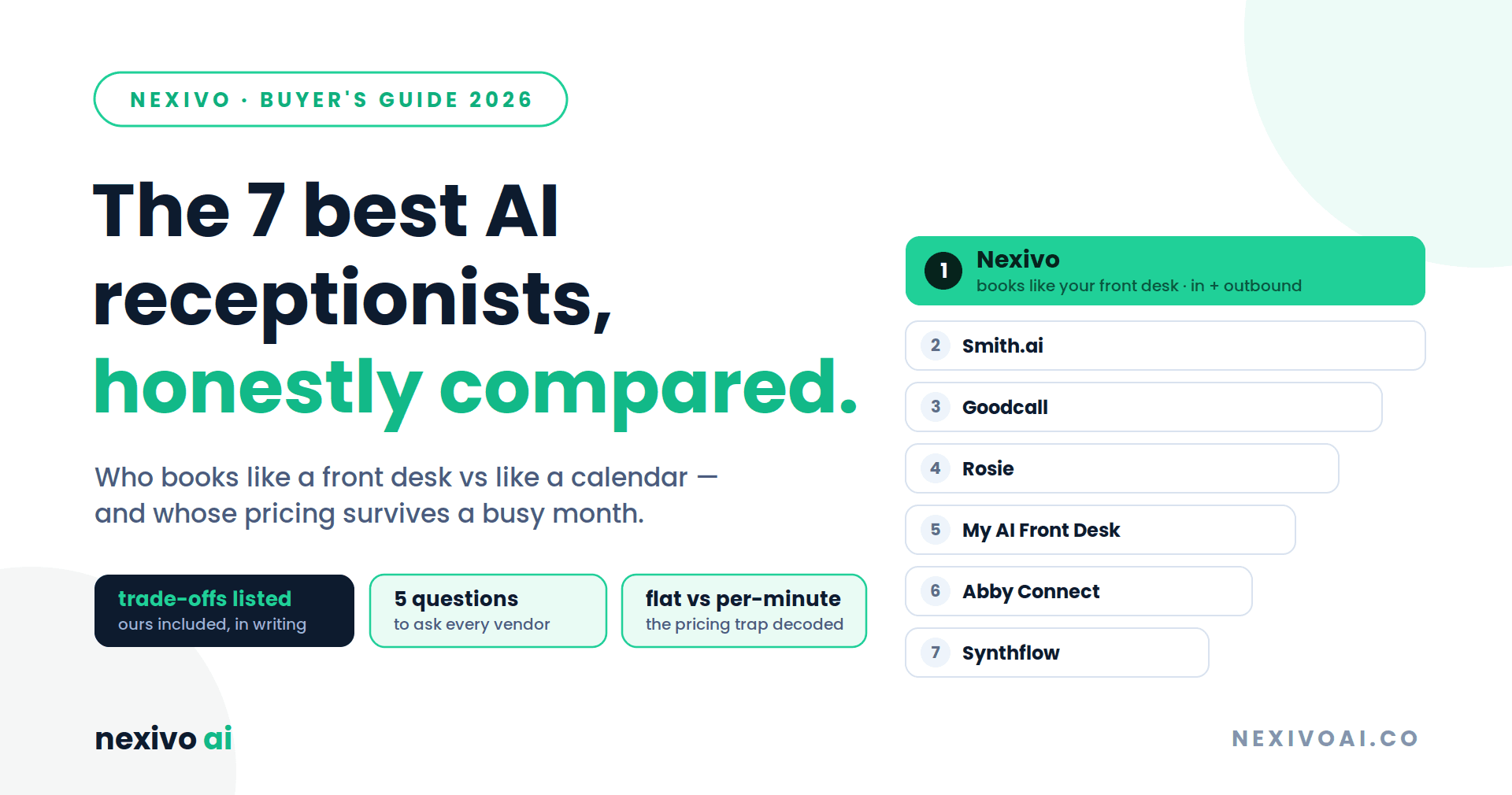
It depends on what breaks first at your front desk. Missed calls plus real scheduling complexity — staff rules, rooms, families booking together — Nexivo leads this list (yes, ours; criteria and our own trade-offs published below). Human backup on hard calls: Smith.ai. Tightest budget: Rosie (~$49/mo). Flat-rate answering only: Goodcall. Whatever you pick, read the pricing model before the sticker — per-minute plans double in exactly the month you're busy.
The quick shortlist
- Nexivo, an inbound and outbound scheduling engine that reads your real front-desk rules, with flat per-location pricing
- Smith.ai, AI with live human agents on standby; the default for law firms
- Goodcall, flat-rate unlimited minutes, answering only
- Rosie, the budget entry for trades and home services
- My AI Front Desk, phone + chat + SMS bundle for low volume
- Abby Connect, AI + dedicated human teams for regulated industries
- Synthflow, build-your-own voice-agent platform
First, the disclosure
We build one of the products on this list. So we publish our evaluation criteria, credit each product's real strengths, and put our trade-offs in writing next to everyone else's. If a vendor's comparison shows you their weaknesses, trust it more. If it doesn't, ask why.
What is an AI receptionist, and why now?
A voice AI that answers your business line, handles routine questions, books appointments, and captures leads without a human on the phone. The market sits at $4.64 billion in 2026, headed for $10.85 billion by 2035, and Gartner finds 91% of customer service leaders under pressure to implement AI this year. The pain underneath is old: roughly a third of small-business calls go unanswered, most callers won't leave voicemail, and at a typical first-booking value around $400, a month of missed calls quietly outcosts every tool on this page.
One honest exclusion first: a handful of calls a week? Buy nothing; a crisp voicemail greeting and disciplined callbacks are free. Mostly long, high-stakes conversations rather than bookings? Keep humans in front; use AI for after-hours and overflow only.
The five questions that actually separate these tools
- Does it book like a front desk, or like a calendar? The big one. Most tools drop an event in an open slot, or text a booking link and hope. A real front desk knows Dr. Sara doesn't do extractions on Fridays, Room 2 is hygiene-only, a returning patient isn't a new record, and a mother booking three kids wants them back-to-back. If the AI can't read those rules, your team inherits the cleanup.
- Inbound only, or both directions? Confirmations, no-show follow-ups, and win-back calls are where recovered revenue lives, and most tools leave them on your staff.
- Does the pricing survive a busy month? Per-minute and per-call models look cheap until you succeed.
- Does it write back to your systems, calendar, CRM, PMS, helpdesk, natively, or via a Zapier chain that breaks quietly?
- How fast is live, really? "Days" and "after two weeks of configuration" are different products.
Our weights, in the open: scheduling depth 30%, call quality 20%, pricing predictability 20%, inbound + outbound 15%, integration write-back 15%.
The list
1. Nexivo, best overall for businesses with real scheduling complexity
Nexivo works both directions: it answers the calls you miss- after-hours, lunch, overflow- with unlimited concurrent calls, and it makes calls: confirmations, CRM-driven follow-ups, reactivations of customers lapsed 18+ months. Same brain on SMS (texts back the moment a call rings out, books in the thread) and webchat.
Standout strengths:
- Books like your front desk, not like a calendar: before confirming, it reads your staff hours and breaks, room and resource constraints, service-type and age-based rules; it matches existing customers instead of creating duplicates, and handles same-staff rescheduling.
- Family booking in one call: right staff, right rooms, back-to-back; the call generic tools bounce back to your team.
- Everything writes back to your calendar, CRM, booking system, and helpdesk (HubSpot, GoHighLevel, OpenDental, Calendly, Cal.com, Airtable on Growth; custom API on Pro), real bookings, not tasks to chase.
- Flat per-location pricing with unlimited concurrent calls; waitlist fill, text-to-pay via Stripe, WhatsApp reminders, emergency routing, 50+ languages on Pro, SOC 2 at the enterprise tier.
- Live in ~3 days, no-code, keep your existing phone system, no VoIP switch, no hardware. Currently answering for 150+ businesses across the US and Canada; 24,600+ calls handled.
Honest trade-offs: demo-first onboarding, no self-serve free tier. The $199 entry sits above budget tools; if you purely need answering, cheaper options below do that job. And we're younger than decade-old incumbents; our track record is 150+ businesses, not 20 million calls.
Pricing: Starter $199/mo (300 min, ~100–150 calls) · Growth $499/mo (1,200 min, full CRM/PMS sync) · Pro $899/mo (unlimited minutes). Flat, per location; annual saves 20%. Book a free demo →
2. Smith.ai, best for law firms wanting human backup
AI answering with a live human-agent network behind it, routine calls automated, complex intake handed to humans (~$3/handoff), deep legal integrations.
Trade-offs: per-call pricing from ~$95/mo climbs at volume; overbuilt for a salon. vs Nexivo: humans on standby for high-stakes intake vs bookings-with-rules plus outbound at flat cost.
3. Goodcall, best flat-rate for answering-only solopreneurs
Unlimited minutes from ~$79/mo, predictable billing. Trade-offs: unique-caller caps per tier, Zapier-reliant integrations, no number porting. vs Nexivo: answers predictably; doesn't run your schedule's rules or call outbound.
4. Rosie, best budget entry for trades
From ~$49/mo with spam filtering, aimed at home services. Trade-offs: booking and transfers sit on the ~$149/mo tier; Zapier integrations; per-minute overages. vs Nexivo: the right first step on a tight budget; the step up buys rules-aware booking, both directions.
5. My AI Front Desk, best low-volume bundle
Phone, web chat, SMS, and a light CRM from ~$99/mo. Trade-offs: ~200-minute cap with overages; limited outbound. vs Nexivo: solid for a quiet line; scheduling-heavy businesses hit ceilings.
6. Abby Connect, best dedicated-human hybrid
AI plus a small dedicated human team that learns your account; bilingual, HIPAA-capable. Trade-offs: per-minute pricing (from ~$99/50 min) scales with volume. vs Nexivo: human continuity when required, vs continuity via CRM write-back and customer matching at flat cost.
7. Synthflow, best for teams building custom voice agents
A no-code platform for assembling agents, with BYO telephony in both directions. Trade-offs: a platform, not a turnkey receptionist; you're the builder. vs Nexivo: construct an agent, vs a working front desk this week.
Comparison at a glance
Nexivo, best for scheduling-heavy SMBs. Real front-desk scheduling rules (staff, rooms, service types, family bookings): yes. Outbound calls: yes. Pricing: flat per location, from $199/mo.
Smith.ai, best for law firms. Scheduling rules: partial, tuned for intake. Outbound: limited. Pricing: per call, from ~$95/mo.
Goodcall, best for answering-only solopreneurs. Scheduling rules: no. Outbound: no. Pricing: flat with unique-caller caps, from ~$79/mo.
Rosie, best for trades on a budget. Scheduling rules: on the higher tier only. Outbound: no. Pricing: per-minute tiers, from ~$49/mo.
My AI Front Desk, best for low call volume. Scheduling rules: no. Outbound: limited. Pricing: minute caps with overages, from ~$99/mo.
Abby Connect, best for regulated industries wanting humans. Scheduling rules: via the human team. Outbound: limited. Pricing: per minute, from ~$99 for 50 minutes.
Synthflow, best for builders. Scheduling rules: whatever you build. Outbound: yes, if you build it. Pricing: per minute, from ~$29/mo.
Competitor figures from public pricing pages, late 2026; confirm current numbers with each vendor.
The bottom line
Every tool here answers phones; that's solved. What decides your experience is scheduling depth, pricing model, and whether the work after the call gets automated or lands back on your team. Ask every vendor, including us, the five questions above, and demand a live demo on your scheduling rules, not a canned one.
Ready to test yours? Book a free Nexivo demo, bring your messiest scheduling rule and your family-booking scenario. If we can't handle it, you'll know in twenty minutes, which is exactly the point of a demo.
- check_circleThe category's real divide is scheduling depth: most tools book like a calendar (drop an event, text a link); rules-aware systems read staff hours, rooms, service types, and family bookings before confirming — that's the difference your front desk feels daily.
- check_circlePricing model beats sticker price: per-minute and per-call plans (Rosie, Abby Connect, Smith.ai) scale with your success; flat models (Nexivo per location, Goodcall with caps) stay predictable in the busy month you bought the tool for.
- check_circleOutbound is where recovered revenue lives: confirmations, no-show follow-ups, and 18-month reactivations — only some tools make calls; most leave that work on your team.
- check_circleMatch the tool to what breaks first: Nexivo for scheduling complexity both directions, Smith.ai for human-backed legal intake, Rosie/Goodcall for budget answering, Synthflow if you'd rather build.
- check_circleThe demo filter: ask every vendor, including us — to run your messiest scheduling rule live, not their canned scenario. Twenty minutes settles what no comparison can.