What Is Odoo ERP? Complete Beginner’s Guide to Features, Cost, Modules & Implementation
A beginner-friendly guide to Odoo ERP covering features, modules, cost, implementation, AI capabilities, and how it helps businesses replace disconnected tools.

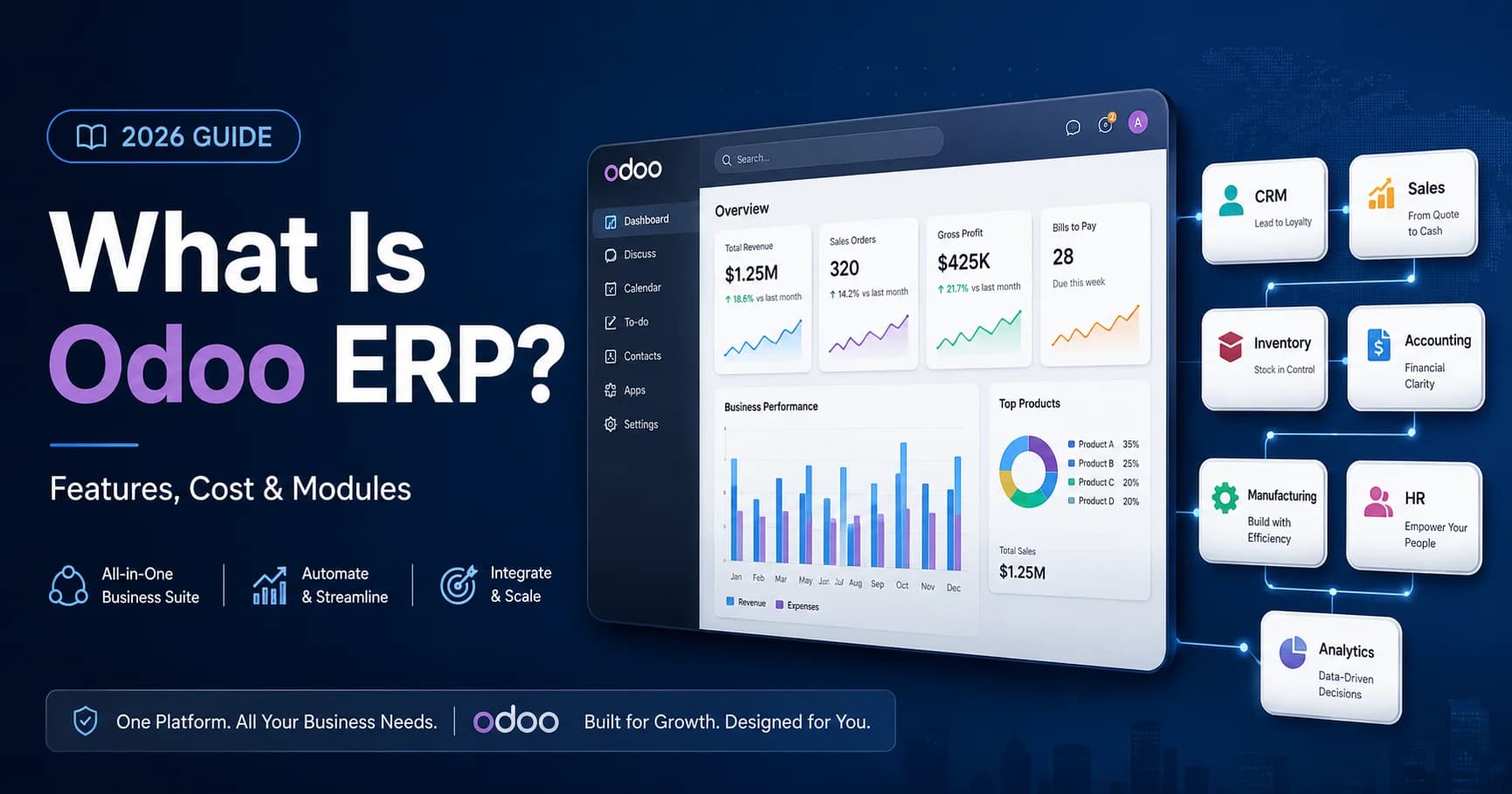
Odoo ERP is an all-in-one business management platform that connects sales, CRM, accounting, inventory, manufacturing, HR, eCommerce, and other operations in one system. It helps businesses replace disconnected tools, automate workflows, reduce manual data entry, and manage real-time business data from a single platform.
If you have been searching for ERP software, you have probably seen the name Odoo and wondered what it actually does, how it works, what it costs, and whether it is the right system for your business.
This guide explains Odoo ERP in plain English. It covers Odoo modules, pricing, implementation, Community vs Enterprise editions, AI features, use cases, competitors, and the key questions a business owner should ask before moving to Odoo.
Short answer: Odoo ERP is an all-in-one business management platform that connects sales, CRM, accounting, inventory, manufacturing, HR, eCommerce, and other operations in one integrated system. It helps businesses replace disconnected tools, automate workflows, and manage real-time data from a single source of truth.
What Is Odoo ERP?
Odoo ERP is an open-source business management platform that brings multiple business functions into one connected system. Instead of using separate software for accounting, CRM, inventory, sales, HR, projects, eCommerce, and reporting, Odoo allows these departments to work from the same database.
For example, when a customer order is created in Odoo Sales, the stock level can update in Inventory, the invoice can be prepared in Accounting, and the customer record can update in CRM. This reduces manual data entry, prevents duplicate work, and gives management a clearer view of business performance.
Odoo started in Belgium in 2005 under the name TinyERP, later became OpenERP, and was rebranded as Odoo in 2014. Today, it is one of the most widely used ERP platforms for small and mid-sized businesses because of its modular structure, flexible deployment options, and broad business app ecosystem.
What Does ERP Mean?
ERP stands for Enterprise Resource Planning. It refers to software that manages and connects a company’s core business processes, including finance, sales, purchasing, inventory, supply chain, manufacturing, HR, and customer relationships.
The word “enterprise” can sound like ERP is only for large corporations, but that is no longer true. Modern ERP systems such as Odoo are used by small businesses, growing SMBs, retailers, manufacturers, service companies, eCommerce brands, and multi-location businesses.
A simple way to understand ERP is this: ERP is the operating system of your business. Just as a computer operating system connects applications and files, an ERP connects departments, workflows, users, and data.
How Does Odoo ERP Work?
Odoo works through a modular architecture. Businesses do not need to start with every application at once. They can begin with the modules they need today and add more as operations grow.
Here is a simple example of how Odoo modules work together:
- A customer places an order through Odoo Sales or eCommerce.
- Odoo Inventory automatically updates available stock.
- Odoo Accounting prepares the invoice and payment record.
- Odoo Purchase can trigger replenishment if stock is low.
- Odoo CRM updates the customer profile and communication history.
- Managers can view sales, stock, cash flow, and performance in real time.
This connected workflow is the main reason businesses move to Odoo. It removes the need to copy the same information between Excel, QuickBooks, CRM tools, inventory software, and separate reporting dashboards.
Odoo’s Core Modules: What Is Included?
Odoo offers a broad suite of official business applications covering sales, CRM, accounting, inventory, manufacturing, HR, eCommerce, point of sale, project management, documents, marketing, and more. The exact apps available depend on the Odoo version, edition, and hosting plan.
Sales and CRM
- CRM — manage leads, opportunities, follow-ups, and sales pipelines.
- Sales — create quotations, sales orders, pricelists, and customer contracts.
- eCommerce — run an online storefront connected with inventory and accounting.
- Point of Sale — manage retail or restaurant sales from a POS system.
Finance and Accounting
- Accounting — invoices, bills, bank reconciliation, tax reports, and financial statements.
- Invoicing — create and send invoices without running a full accounting setup.
- Expenses — submit, approve, and reimburse employee expenses.
- Payroll — manage salaries and payslips where supported by localisation.
Operations and Supply Chain
- Inventory — manage stock, warehouses, barcodes, routes, and replenishment.
- Purchase — manage vendors, RFQs, purchase orders, and procurement workflows.
- Manufacturing — manage bills of materials, production orders, work centres, and planning.
- Maintenance — track equipment, maintenance schedules, and repair activities.
Human Resources
- Employees — manage employee records, contracts, departments, and organisational charts.
- Recruitment — publish jobs, track applicants, and manage hiring pipelines.
- Time Off — manage leave requests, approvals, and balances.
- Appraisals — manage performance reviews and employee goals.
Productivity and Project Management
- Project — manage tasks, Kanban boards, Gantt views, timesheets, and milestones.
- Discuss — internal communication and team collaboration.
- Sign — send and manage digital signatures.
- Documents — organise company documents, vendor bills, contracts, and internal files.
Odoo Community vs Odoo Enterprise
Odoo is available in two main editions: Community and Enterprise. Choosing the right edition depends on your budget, technical capacity, required modules, hosting preference, and support needs.
Odoo Community
- Free and open-source.
- Suitable for businesses with technical resources or an implementation partner.
- Provides access to many core Odoo functions.
- Requires self-hosting or third-party hosting.
- Does not include the full Enterprise feature set, official Enterprise support, or some advanced apps.
Odoo Enterprise
- Paid subscription with official Odoo support and additional features.
- Available through Odoo Online, Odoo.sh, or on-premise depending on the plan.
- Includes access to advanced apps and usability improvements.
- Better suited for businesses that want a managed, professionally supported ERP system.
- Pricing varies by country, edition, billing cycle, and plan, so businesses should always confirm the latest pricing directly from Odoo before budgeting.
For most growing businesses, the decision is not simply “free vs paid.” The real question is total cost of ownership. Community may have no licence fee, but hosting, support, upgrades, custom development, and maintenance still need to be considered. Enterprise has a recurring subscription cost, but it can reduce risk and simplify long-term operations.
Who Is Odoo ERP Best For?
Odoo is especially useful for businesses that have outgrown spreadsheets, disconnected accounting software, or separate apps that do not share data.
Odoo works well for:
- Small businesses with 5–50 employees that need better control over sales, inventory, and finance.
- Growing SMBs with 50–500 employees that need unified reporting across departments.
- Manufacturing companies managing production orders, raw materials, BOMs, and procurement.
- Retail businesses running physical stores, online sales, inventory, and accounting together.
- Healthcare and service businesses managing appointments, billing, CRM, HR, and support workflows.
- eCommerce companies needing inventory, fulfilment, customer data, and accounting in one place.
- Distribution and wholesale businesses managing vendors, pricing, warehouses, and logistics.
Odoo may not be the best fit for organisations with extremely complex regulatory requirements or highly specialised industry needs unless there is a clear customisation and implementation plan. For very large enterprises, SAP, Oracle, or Microsoft Dynamics may sometimes be more appropriate depending on the situation.
What Does Odoo ERP Cost?
Odoo cost has several parts: software subscription, implementation, hosting, customisation, data migration, training, and ongoing support.
1. Software licence cost
Odoo Community has no software licence fee. Odoo Enterprise is paid on a per-user/month basis, with pricing depending on country, plan, billing cycle, and deployment type. Odoo’s official pricing should always be checked before final budgeting because pricing can change by region and over time.
2. Implementation cost
Implementation is usually the bigger investment. This includes discovery, module configuration, workflow design, data migration, testing, training, and go-live support.
- Small business implementation: often around $3,000–$8,000 depending on modules and data quality.
- Mid-sized implementation: often around $10,000–$35,000 depending on integrations and process complexity.
- Complex multi-company or highly customised setup: can exceed $40,000–$100,000+.
These ranges are general planning estimates. The real cost depends on the number of modules, complexity of workflows, reporting requirements, integrations, data migration needs, and the quality of the implementation partner.
3. Hosting and support cost
Businesses can use Odoo Online, Odoo.sh, or self-hosted deployment depending on the level of customisation required. Ongoing support may include user support, bug fixes, training, server maintenance, version upgrades, security, and new feature development.
4. Return on investment
The ROI of Odoo usually comes from reducing duplicate work, improving inventory accuracy, speeding up invoicing, reducing manual reporting, improving sales follow-up, and giving leadership real-time visibility. For many SMBs, the biggest value is not only software savings but operational control.
Odoo vs Other ERP Systems
Odoo competes with ERP and business management systems such as SAP Business One, Microsoft Dynamics 365 Business Central, NetSuite, Zoho, Sage, and QuickBooks-based setups.
| Feature | Odoo | SAP Business One | Microsoft Dynamics | NetSuite |
| Best for | SMBs and growing companies | Mid-market companies | Mid-market and enterprise | Mid-market and enterprise |
| Open source option | Yes | No | No | No |
| Modular apps | Very broad | Moderate | Strong | Strong |
| Customisation | High | Medium | Medium to high | Medium |
| Entry cost | Low to medium | High | Medium to high | High |
| Implementation complexity | Flexible | High | Medium to high | High |
Odoo’s main advantage for SMBs is the combination of flexible pricing, modular implementation, broad app coverage, and strong customisation potential. The trade-off is that Odoo still needs proper planning and implementation. A poorly configured Odoo system can create confusion, just like any other ERP.
Odoo AI Features in 2026
Artificial intelligence is becoming a more visible part of Odoo. In recent Odoo versions, AI capabilities include context-aware assistance, AI fields, and AI-powered document automation. These features are designed to help users create content, summarise information, classify documents, and reduce repetitive manual work inside the Odoo environment.
Examples of AI-related Odoo use cases include:
- Using AI assistance to draft or improve text inside business records.
- Generating product descriptions, notes, or structured field values using AI fields.
- Automating document classification and routing in the Documents app.
- Reducing manual handling of repetitive documents such as vendor bills, contracts, or internal files.
For businesses evaluating Odoo in 2026, the important point is not simply whether Odoo has AI features. The real value comes from configuring AI around actual workflows: sales follow-up, document processing, reporting, customer support, finance operations, and inventory decisions.
How Is Odoo Implemented?
Odoo implementation is not just software installation. It is a structured business transformation project that should match the ERP system to real workflows.
Step 1: Discovery and scoping
The implementation partner studies current processes, tools, departments, reporting gaps, pain points, and business goals. This stage defines which Odoo modules are needed and which workflows should be configured first.
Step 2: Configuration and setup
The Odoo environment is configured, modules are activated, users and access rights are created, and workflows are set according to the company’s operations.
Step 3: Data migration
Existing data such as customers, vendors, products, stock levels, invoices, chart of accounts, and historical records are cleaned and imported from QuickBooks, Excel, Sage, Zoho, legacy ERP, or other systems.
Step 4: Customisation and integrations
If standard Odoo features do not fully match the business process, custom modules, workflows, reports, or third-party integrations may be developed.
Step 5: Testing
The system is tested using real business scenarios before go-live. This helps catch workflow errors, missing fields, reporting gaps, and user permission issues.
Step 6: Training and go-live
Employees are trained department by department. The company then moves from old systems to Odoo with go-live support.
Step 7: Ongoing support and optimisation
After go-live, the system should be monitored, refined, and improved. New modules, reports, automations, or integrations can be added as the business grows.
Simple implementations may take 4–6 weeks. Mid-sized implementations often take 8–16 weeks. Complex multi-company, multi-location, or highly customised implementations can take 3–6 months or longer.
Is Odoo Right for Your Business? Quick Checklist
Odoo may be a strong fit if your business answers yes to three or more of these questions:
- Are you using three or more separate tools that do not talk to each other?
- Does your team enter the same data in multiple systems?
- Do you struggle to see real-time sales, inventory, cash flow, or order status?
- Are spreadsheets becoming difficult to manage?
- Is manual reporting taking too much time every week?
- Are you planning to scale in the next 12–24 months?
- Do you need to manage multiple locations, warehouses, companies, or departments?
If the answer is yes, Odoo may help you move from operational chaos to a single connected business system.
Odoo ERP Implementation for US, Pakistan, Middle East, and Global SMBs
GetOdooAI helps small and mid-sized businesses in the United States, Pakistan, the Middle East, and international markets plan, implement, customise, and migrate to Odoo ERP. Whether you are moving from QuickBooks, Excel, Zoho, Sage, or disconnected SaaS tools, the goal is to configure Odoo around your real business workflows, not force your business into a generic ERP template.
This GEO-focused positioning is important because many businesses search for Odoo implementation support by location, industry, and migration need. GetOdooAI can support companies looking for Odoo implementation, Odoo customisation, QuickBooks to Odoo migration, AI-powered Odoo automation, and ongoing ERP support.
How GetOdooAI Implements Odoo
GetOdooAI is an Odoo ERP implementation and AI automation company serving SMBs across industries such as retail, manufacturing, healthcare, real estate, distribution, and services.
The team supports the complete Odoo lifecycle: consultation, module planning, ERP implementation, workflow configuration, customisation, third-party integration, QuickBooks or legacy system migration, AI automation setup, training, and post-launch support.
The focus is simple: help businesses replace disconnected tools with one connected ERP system that improves visibility, saves time, reduces manual work, and supports long-term growth.
Not sure which Odoo modules your business needs? Book a free Odoo discovery call with GetOdooAI. The team can review your current tools, workflows, reporting gaps, and growth plans, then recommend a realistic Odoo setup without unnecessary modules or over-customisation.
Summary: What You Need to Know About Odoo ERP
- Odoo ERP is an integrated business management system for sales, CRM, accounting, inventory, HR, manufacturing, eCommerce, and more.
- It works through modular apps, so businesses can start small and expand over time.
- Odoo Community is free and open-source; Odoo Enterprise is paid and includes advanced features and support.
- Odoo implementation requires proper planning, data migration, configuration, training, and post-launch support.
- Odoo is especially strong for SMBs that want to replace disconnected tools and gain real-time business visibility.
- Recent Odoo versions include AI-related features that can support productivity and document automation.
- GetOdooAI helps businesses implement, customise, migrate, and optimise Odoo for real operational impact.
Ready to see what Odoo would look like for your business? Book a free discovery call with GetOdooAI and get a practical recommendation based on your current tools, workflows, and growth goals.
- check_circleOdoo ERP connects multiple business departments into one integrated system.
- check_circleBusinesses can start with only the modules they need, such as CRM, Sales, Inventory, Accounting, or Manufacturing.
- check_circleOdoo is suitable for small and mid-sized businesses that want to replace spreadsheets, QuickBooks, or disconnected software tools.
- check_circleOdoo Community is open-source, while Odoo Enterprise includes advanced features, hosting options, support, and additional business apps.
- check_circleSuccessful Odoo implementation requires proper workflow mapping, configuration, data migration, testing, training, and ongoing support.
- check_circleGetOdooAI helps businesses plan, implement, customise, and migrate to Odoo ERP with a focus on automation and operational efficiency.
GetOdooAI Editorial Team is a group of ERP consultants, Odoo implementation specialists, and business automation experts focused on helping small and mid-sized businesses simplify operations through Odoo ERP. The team writes practical guides on ERP implementation, Odoo customization, AI-powered business automation, QuickBooks migration, and digital transformation for growing companies.